Site Information ...

ExtJs PagingMemoryProxy example using JSON data from Java Servlet AJAX request

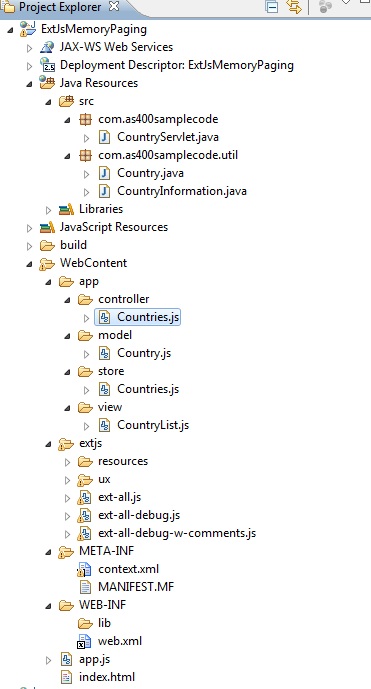
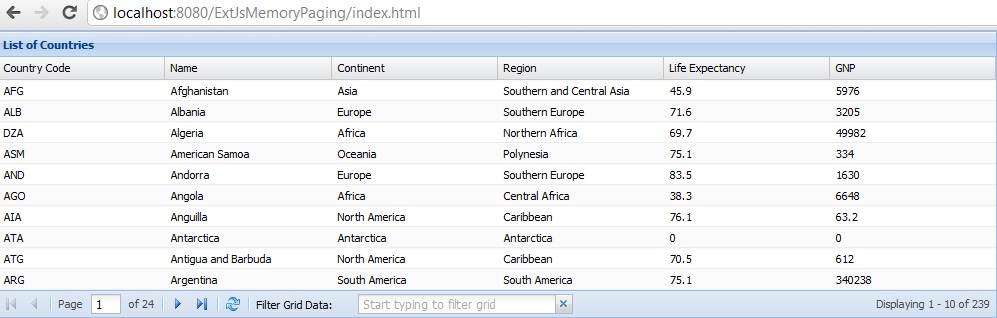
The following example is built on the ExtJs user extension Ext.ux.data.PagingMemoryProxy, Paging Memory Proxy which allows to use paging grid with in memory dataset. In the example below data is coming in the form of a JSON object from a Java Servlet using an AJAX request which is more practical that using local data. Also provided is a filter that will locally filter complete stored data not just the grid data which is just the page that it displays.

The example is based on the MVC architecture provided in ExtJs 4.


ExtJs PagingMemoryProxy Ajax JSON data from Java Servlet with Grid Filter

Step 1: Application starting point index.html

<html>
<head>
    <title>ExtJs PagingMemoryProxy Ajax JSON data from Java Servlet with Grid Filter</title>

    <link rel="stylesheet" type="text/css" href="extjs/resources/css/ext-all.css">
   
    <script type="text/javascript" src="extjs/ext-all-debug.js"></script>
    <script type="text/javascript" src="app.js"></script>

</head>
<body></body>
</html>

Step 2: Application JavaScript file app.js

Ext.Loader.setPath('Ext.ux', 'extjs/ux');

Ext.Loader.setConfig({ 
    enabled: true 
    });

Ext.require([
             'Ext.data.*',
             'Ext.grid.*',
             'Ext.ux.data.PagingMemoryProxy'
         ]);


Ext.application({
    name: 'SAMPLE',

    appFolder: 'app',
   
    controllers: [
                  'Countries'
              ],

    launch: function() {
        console.log("Launching the application!");
        Ext.Ajax.request({
        loadMask: true,
        url: 'CountryServlet',
        scope: this,
        success: function(response, callOptions) {
            myData = Ext.decode(response.responseText);
            myTempData = Ext.decode(response.responseText);
            Ext.create('Ext.container.Viewport', {
                items: [
                    {
                        xtype: 'countrylist',
                    }
                ]
            });
        },
        failure: function(response, callOptions) {
           // Use the response
        }
    });
       
    }
});

Step 3: JavaScript source file for country model Country.js

Ext.define('SAMPLE.model.Country', {
    extend: 'Ext.data.Model',
    fields: [
             'code',
             'name',
             'continent',
             'region',
             'lifeExpectancy',
             'gnp'
             ]
});

Step 4: JavaScript source file for country store Countries.js

var myData;
var myTempData;

Ext.define('SAMPLE.store.Countries', {
    extend: 'Ext.data.Store',
    model: 'SAMPLE.model.Country',
    pageSize: 10,
    listeners: {
        beforeload: function(store, operation, options){
            console.log("My Store data is loading!");
        }
    }
});

Step 5: JavaScript source file for country grid panel CountryList.js

Ext.define('SAMPLE.view.CountryList' ,{
    extend: 'Ext.grid.Panel',
    alias : 'widget.countrylist',
    title : 'List of Countries',
    store : 'Countries',
    loadMask: true,
    autoheight: true,
    width: 1000,
    dockedItems: [{
        xtype: 'pagingtoolbar',
        store: 'Countries',  
        dock: 'bottom',
        displayInfo: true,
        items: [
                { 
                    xtype: 'tbseparator' 
                },
                {
                    xtype : 'trigger',
                    itemId : 'gridTrigger',
                    fieldLabel: 'Filter Grid Data',
                    triggerCls : 'x-form-clear-trigger',
                    emptyText : 'Start typing to filter grid',
                    size : 30,
                    minChars : 1,
                    enableKeyEvents : true,
                    onTriggerClick : function(){
                        this.reset();
                        this.fireEvent('triggerClear');
                    }
                }
        ]
    }],
    initComponent: function() {
       
        this.columns = [
            {header: 'Country Code', dataIndex: 'code',  flex: 1},
            {header: 'Name', dataIndex: 'name', flex: 1},
            {header: 'Continent', dataIndex: 'continent', flex: 1},
            {header: 'Region', dataIndex: 'region', flex: 1},
            {header: 'Life Expectancy', dataIndex: 'lifeExpectancy', flex: 1},
            {header: 'GNP', dataIndex: 'gnp', flex: 1}
        ];

        this.callParent(arguments);
    }


});

Step 6: JavaScript source file for the application controller Countries.js

Ext.define('SAMPLE.controller.Countries', {
            extend : 'Ext.app.Controller',

            stores : ['Countries'],
            models : ['Country'],
            views  : ['CountryList'],
            refs: [{
                ref: 'myGrid', 
                selector: 'grid'
            }],  

            init : function() {
                this.control({
                            'viewport > panel' : {
                                render : this.onPanelRendered
                            },
                            'countrylist #gridTrigger' : {
                                keyup : this.onTriggerKeyUp,
                                triggerClear : this.onTriggerClear
                            }
                        });
                },

                onPanelRendered : function() {
                    console.log('The panel was rendered');
                    this.getCountriesStore().setProxy({
                        type: 'pagingmemory',
                        data: myTempData,
                        reader: {
                            type: 'json',
                            totalProperty: 'totalCount',
                            root: 'countries',
                            successProperty: 'success'
                        }
                    });
                this.getCountriesStore().load();
                },
               
                onTriggerKeyUp : function(t) {
                    console.log('You typed something!');
                   
                        var thisRegEx = new RegExp(t.getValue(), "i");
                        var grid = this.getMyGrid();
                        records = [];
                        Ext.each(myData.countries, function(record) {
                            for (var i = 0; i < grid.columns.length; i++) {
                                // Do not search the fields that are passed in as omit columns
                                if (grid.omitColumns) {
                                    if (grid.omitColumns.indexOf(grid.columns[i].dataIndex) === -1) {
                                        if (thisRegEx.test(record[grid.columns[i].dataIndex])) {
                                            if (!grid.filterHidden && grid.columns[i].isHidden()) {
                                                continue;
                                            } else {
                                                records.push(record);
                                                break;
                                            };
                                        };
                                    };
                                } else {
                                    if (thisRegEx.test(record[grid.columns[i].dataIndex])) {
                                        if (!grid.filterHidden && grid.columns[i].isHidden()) {
                                            continue;
                                        } else {
                                            records.push(record);
                                            break;
                                        };
                                    };
                                };
                            }  
                        });
                        myTempData.countries = records;
                        myTempData.totalCount = records.length;
                        this.getCountriesStore().load();
                },
               
                onTriggerClear : function() {
                    console.log('Trigger got reset!');
                    myTempData.countries = myData.countries;
                    myTempData.totalCount = myData.totalCount;
                    this.getCountriesStore().load();
                }
           
        });

ExtJs PagingMemoryProxy Ajax JSON data from Java Servlet with Grid Filter
Click here for the Java Servlet sample code used in this Tutorial

ExtJs Grid JSON Java Servlet example with Grid Filter using TriggerField

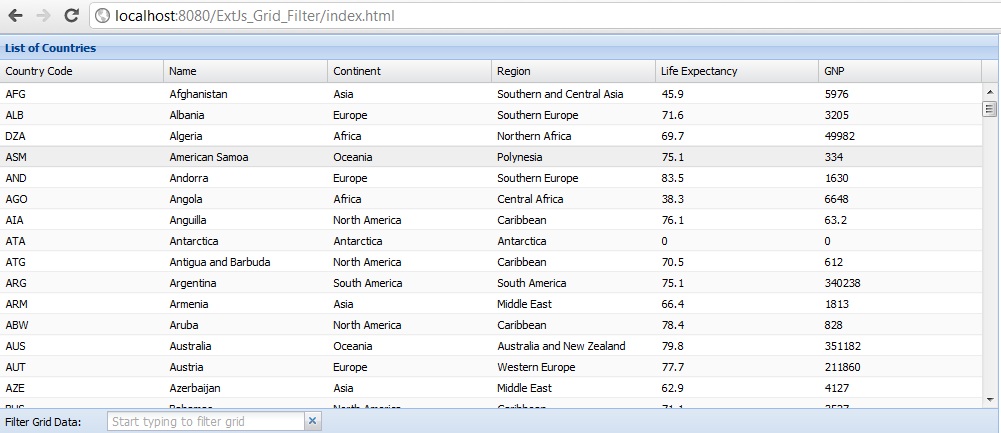
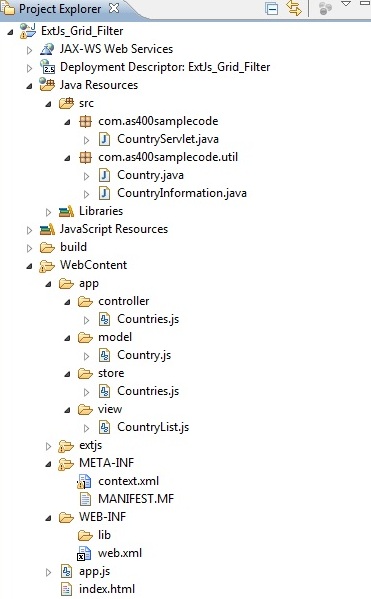
Grids are an excellent way of showing large amounts of tabular data on the client side. GridPanel makes it easy to fetch, sort and filter large amounts of data. Grids are composed of two main pieces - a Store full of data and a set of columns to render. The example below makes request to the Java Servlet which in turn gets it data from MySQL database and send a JSON object back. The store parses the JSON object and the grid then displays them based on Object Model.


ExtJs Grid JSON Java Servlet example with Grid Filter using TriggerField

Step 1: Application starting point index.html

<html>
<head>
    <title>ExtJs Grid JSON Java Servlet example with Grid Filter </title>

    <link rel="stylesheet" type="text/css" href="extjs/resources/css/ext-all.css">

    <script type="text/javascript" src="extjs/ext-all-debug.js"></script>
    <script type="text/javascript" src="app.js"></script>

</head>
<body></body>
</html>

Step 2: Application JavaScript file app.js

Ext.Loader.setConfig({ 
    enabled: true 
    });

Ext.application({
    name: 'CN',

    appFolder: 'app',
   
    controllers: [
                  'Countries'
              ],

    launch: function() {
        Ext.create('Ext.container.Viewport', {
            items: [
                {
                    xtype: 'countrylist',
                }
            ]
        });
    }
});

Step 3: JavaScript source file for country model Country.js

Ext.define('CN.model.Country', {
    extend: 'Ext.data.Model',
    fields: [
             'code',
             'name',
             'continent',
             'region',
             'lifeExpectancy',
             'gnp'
             ]
});

Step 4: JavaScript source file for country store Countries.js

Ext.define('CN.store.Countries', {
    extend: 'Ext.data.Store',
    model: 'CN.model.Country',
    autoLoad: true,
   
    proxy: {
        type: 'ajax',
        url: 'CountryServlet',
        reader: {
            type: 'json',
            totalProperty: 'totalCount',
            root: 'countries',
            successProperty: 'success'
        },
     }
});

Step 5: JavaScript source file for country grid panel CountryList.js

Ext.define('CN.view.CountryList' ,{
    extend: 'Ext.grid.Panel',
    alias : 'widget.countrylist',
    title : 'List of Countries',
    store : 'Countries',
    loadMask: true,
    height: 400,
    width: 1000,
    omitColumns: ['lifeExpectancy','gnp'],
    dockedItems: [{
        xtype: 'toolbar',
        dock: 'bottom',
        displayInfo: true,
        items: [{
                    xtype : 'trigger',
                    itemId : 'gridTrigger',
                    fieldLabel: 'Filter Grid Data',
                    triggerCls : 'x-form-clear-trigger',
                    emptyText : 'Start typing to filter grid',
                    size : 30,
                    minChars : 1,
                    enableKeyEvents : true,
                    onTriggerClick : function(){
                        this.reset();
                        this.fireEvent('triggerClear');
                    }
                }
        ]
    }],
    initComponent: function() {
       
        this.columns = [
            {header: 'Country Code', dataIndex: 'code',  flex: 1},
            {header: 'Name', dataIndex: 'name', flex: 1},
            {header: 'Continent', dataIndex: 'continent', flex: 1},
            {header: 'Region', dataIndex: 'region', flex: 1},
            {header: 'Life Expectancy', dataIndex: 'lifeExpectancy', flex: 1},
            {header: 'GNP', dataIndex: 'gnp', flex: 1}
        ];

        this.callParent(arguments);
    }
 
});

Step 6: JavaScript source file for the application controller Countries.js

Ext.define('CN.controller.Countries', {
            extend : 'Ext.app.Controller',

            //define the stores
            stores : ['Countries'],
            //define the models
            models : ['Country'],
            //define the views
            views : ['CountryList'],
            refs: [{
                ref: 'myGrid', 
                selector: 'grid'
            }], 
           
            init : function() {
                this.control({
                   
                    'viewport > panel' : {
                        render : this.onPanelRendered
                    },
                    'countrylist #gridTrigger' : {
                                keyup : this.onTriggerKeyUp,
                                triggerClear : this.onTriggerClear
                            }
                   
                });
            },

            onPanelRendered : function() {
                //just a console log to show when the panel si rendered
                console.log('The panel was rendered');
            },
           
            onTriggerKeyUp : function(t) {
                    console.log('You typed something!');
                   
                        var thisRegEx = new RegExp(t.getValue(), "i");
                        var store = this.getCountriesStore();
                        var grid = this.getMyGrid();
                        store.filterBy(function(rec) {
                            for (var i = 0; i < grid.columns.length; i++) {
                                // Do not search the fields that are passed in as omit columns
                                if (grid.omitColumns) {
                                    if (grid.omitColumns.indexOf(grid.columns[i].dataIndex) === -1) {
                                        if (thisRegEx.test(rec.get(grid.columns[i].dataIndex))) {
                                            if (!grid.filterHidden && grid.columns[i].isHidden()) {
                                                continue;
                                            } else {
                                                return true;
                                            };
                                        };
                                    };
                                } else {
                                    if (thisRegEx.test(rec.get(grid.columns[i].dataIndex))) {
                                        if (!grid.filterHidden && grid.columns[i].isHidden()) {
                                            continue;
                                        } else {
                                            return true;
                                        };
                                    };
                                };
                            }
                            return false;
                        });
                },
               
                onTriggerClear : function() {
                    console.log('Trigger got reset!');
                    var store = this.getCountriesStore();
                    store.clearFilter();
                }
           
    });

Click here for next Chapter

ExtJs Grid JSON Java Servlet example with Grid Filter using TriggerField - Part 2

Click here for previous Chapter
In the previous chapter we have looked into the sample source codes for creating the grid panel using ExtJs, here we are going to work on the Java Servlet program that will get us the data from MySQL database in the form of a JSON object.


ExtJs Grid JSON Java Servlet example with Grid Filter using TriggerField

Step 7: MySQL JDBC data source context.xml

<?xml version="1.0" encoding="UTF-8"?>
<Context reloadable="true">
<Resource auth="Container"
name="jdbc/mysql"
type="javax.sql.DataSource"
driverClassName="com.mysql.jdbc.Driver"
url="jdbc:mysql://localhost:3306/world"
username="root"
password="mysql"
maxIdle="10"
maxActive="200"
maxWait="5"
removeAbandoned="true"
removeAbandonedTimeout="1200"
/>
</Context>

Step 8: Web Application config file web.xml

<?xml version="1.0" encoding="UTF-8"?>
<web-app xmlns:xsi="http://www.w3.org/2001/XMLSchema-instance" xmlns="http://java.sun.com/xml/ns/javaee" xmlns:web="http://java.sun.com/xml/ns/javaee/web-app_2_5.xsd" xsi:schemaLocation="http://java.sun.com/xml/ns/javaee http://java.sun.com/xml/ns/javaee/web-app_2_5.xsd" id="WebApp_ID" version="2.5">
  <display-name>ExtJs_Grid_Filter</display-name>
  <welcome-file-list>
    <welcome-file>index.html</welcome-file>
    <welcome-file>index.htm</welcome-file>
    <welcome-file>index.jsp</welcome-file>
    <welcome-file>default.html</welcome-file>
    <welcome-file>default.htm</welcome-file>
    <welcome-file>default.jsp</welcome-file>
  </welcome-file-list>
  <servlet>
    <description>Country Servlet</description>
    <display-name>CountryServlet</display-name>
    <servlet-name>CountryServlet</servlet-name>
    <servlet-class>com.as400samplecode.CountryServlet</servlet-class>
  </servlet>
  <servlet-mapping>
    <servlet-name>CountryServlet</servlet-name>
    <url-pattern>/CountryServlet</url-pattern>
  </servlet-mapping>
  <resource-ref>
    <description>MySQL Datasource</description>
    <res-ref-name>jdbc/mysql</res-ref-name>
    <res-type>javax.sql.DataSource</res-type>
    <res-auth>Container</res-auth>
    <res-sharing-scope>Shareable</res-sharing-scope>
  </resource-ref>
</web-app>

Step 9: Source for Country Java Bean Country.java

package com.as400samplecode.util;

public class Country {
   
    String code = null;
    String name = null;
    String continent = null;
    String region = null;
    Double lifeExpectancy = null;
    Double gnp = null;
   
    public String getCode() {
        return code;
    }
    public void setCode(String code) {
        this.code = code;
    }
    public String getName() {
        return name;
    }
    public void setName(String name) {
        this.name = name;
    }
    public String getContinent() {
        return continent;
    }
    public void setContinent(String continent) {
        this.continent = continent;
    }
    public String getRegion() {
        return region;
    }
    public void setRegion(String region) {
        this.region = region;
    }
    public Double getLifeExpectancy() {
        return lifeExpectancy;
    }
    public void setLifeExpectancy(Double lifeExpectancy) {
        this.lifeExpectancy = lifeExpectancy;
    }
    public Double getGnp() {
        return gnp;
    }
    public void setGnp(Double gnp) {
        this.gnp = gnp;
    }

   
}    

Step 10: Source for Country Utility program to get MySQL data CountryInformation.java

package com.as400samplecode.util;

import java.sql.Connection;         
import java.sql.ResultSet;          
import java.sql.SQLException;       
import java.sql.PreparedStatement;  
import java.util.ArrayList;

import javax.naming.Context;        
import javax.naming.InitialContext; 
import javax.sql.DataSource;        

public class CountryInformation {           

    Connection conn = null;            
    PreparedStatement stmt = null;     
    String sql = null;
   
    public ArrayList<Country> getItems(String start, String limit) { 

        ArrayList<Country> countryList = new ArrayList<Country>();   

        try {      
            Context ctx = (Context) new InitialContext().lookup("java:comp/env");
            conn = ((DataSource) ctx.lookup("jdbc/mysql")).getConnection(); 

            sql = "Select * from COUNTRY order by name,code";                      
            stmt = conn.prepareStatement(sql);
            ResultSet rs = stmt.executeQuery(); 
           
            while(rs.next()){ 
                Country country = new Country();
                country.setCode(rs.getString("code").trim());
                country.setName(rs.getString("name").trim());
                country.setContinent(rs.getString("continent").trim());
                country.setRegion(rs.getString("region").trim());
                country.setLifeExpectancy(rs.getString("lifeExpectancy") == null ? new Double(0) : Double.parseDouble(rs.getString("lifeExpectancy").trim()));
                country.setGnp(rs.getString("gnp") == null ? new Double(0)  : Double.parseDouble(rs.getString("gnp").trim()));
                countryList.add(country);
            }                                                                         

            rs.close();                                                               
            stmt.close();                                                             
            stmt = null;                                                              


            conn.close();                                                             
            conn = null;                                                   

        }                                                               
        catch(Exception e){System.out.println(e);}                      

        finally {                                                       

            if (stmt != null) {                                            
                try {                                                         
                    stmt.close();                                                
                } catch (SQLException sqlex) {                                
                    // ignore -- as we can't do anything about it here           
                }                                                             

                stmt = null;                                            
            }                                                        

            if (conn != null) {                                      
                try {                                                   
                    conn.close();                                          
                } catch (SQLException sqlex) {                          
                    // ignore -- as we can't do anything about it here     
                }                                                       

                conn = null;                                            
            }                                                        
        }              

        return countryList;

    }  
   
    public int getTotalCount() { 

        int totalCount = 0; 

        try {      
            Context ctx = (Context) new InitialContext().lookup("java:comp/env");
            conn = ((DataSource) ctx.lookup("jdbc/mysql")).getConnection(); 

            sql = "Select count(*) from COUNTRY";                      
            stmt = conn.prepareStatement(sql);
           
            ResultSet rs = stmt.executeQuery(); 
            while(rs.next()){ 
                totalCount = rs.getInt(1);
                break;
            }                                                                         

            rs.close();                                                               
            stmt.close();                                                             
            stmt = null;                                                              


            conn.close();                                                             
            conn = null;                                                   

        }                                                               
        catch(Exception e){System.out.println(e);}                      

        finally {                                                       

            if (stmt != null) {                                            
                try {                                                         
                    stmt.close();                                                
                } catch (SQLException sqlex) {                                
                    // ignore -- as we can't do anything about it here           
                }                                                             

                stmt = null;                                            
            }                                                        

            if (conn != null) {                                      
                try {                                                   
                    conn.close();                                          
                } catch (SQLException sqlex) {                          
                    // ignore -- as we can't do anything about it here     
                }                                                       

                conn = null;                                            
            }                                                        
        }              

        return totalCount;

    }  


}   

Step 11: Source for Country Servlet program to process request and pass JSON object CountryServlet.java

package com.as400samplecode;

import java.io.IOException;
import java.io.PrintWriter;
import java.util.ArrayList;

import javax.servlet.ServletException;
import javax.servlet.http.HttpServlet;
import javax.servlet.http.HttpServletRequest;
import javax.servlet.http.HttpServletResponse;

import net.sf.json.JSONArray;
import net.sf.json.JSONObject;

import com.as400samplecode.util.Country;
import com.as400samplecode.util.CountryInformation;

public class CountryServlet extends HttpServlet {
    private static final long serialVersionUID = 1L;

    public CountryServlet() {
        super();
    }

    protected void doGet(HttpServletRequest request, HttpServletResponse response) throws ServletException, IOException {
        doPost(request,response);
    }

    protected void doPost(HttpServletRequest request, HttpServletResponse response) throws ServletException, IOException {

        String start = request.getParameter("start");
        String limit = request.getParameter("limit");
       
        PrintWriter out = response.getWriter();
        response.setContentType("text/html");

        JSONArray arrayObj=new JSONArray();

        CountryInformation countryInformation = new CountryInformation();
        ArrayList<Country> countryList = countryInformation.getItems(start,limit);
        for(int i=0;i<countryList.size();i++){
            Country country = countryList.get(i);
            JSONObject itemObj = JSONObject.fromObject(country);
            arrayObj.add(itemObj);
        }

        JSONObject myObj = new JSONObject();
        myObj.put("success", true);
        myObj.put("countries", arrayObj);
        myObj.put("totalCount", countryInformation.getTotalCount());
       
        out.println(myObj.toString());
        out.close();

    }


}

ExtJs 4 File Upload Java Servlet using Apache commons FileUpload Utility

The following example follows the ExtJs 4 MVC framework to create the File Upload form which makes a Java Servlet request to upload the file. The Java Servlet is uses the Apache commons FileUpload Utility.

FileUpload can be used in a number of different ways, depending upon the requirements of your application. In the simplest case, you will call a single method to parse the servlet request, and then process the list of items as they apply to your application. At the other end of the scale, you might decide to customize FileUpload to take full control of the way in which individual items are stored; for example, you might decide to stream the content into a database.


Click here to Download Apache Commons FileUpload jar file


ExtJs 4 File Upload using Apache commons FileUpload Utility

Step 1: Application starting point index.html

<html>
<head>
    <title>ExtJs 4 File Upload</title>

    <link rel="stylesheet" type="text/css" href="extjs/resources/css/ext-all.css">
    <style type="text/css">
        .upload-icon {
            background: url('extjs/icons/fam/image_add.png') no-repeat 0 0 !important;
        }
        .msg .x-box-mc {
            font-size:14px;
        }
        #msg-div {
            position:absolute;
            left:35%;
            top:10px;
            width:300px;
            z-index:20000;
        }
        #msg-div .msg {
            border-radius: 8px;
            -moz-border-radius: 8px;
            background: #F6F6F6;
            border: 2px solid #ccc;
            margin-top: 2px;
            padding: 10px 15px;
            color: #555;
        }
        #msg-div .msg h3 {
            margin: 0 0 8px;
            font-weight: bold;
            font-size: 15px;
        }
        #msg-div .msg p {
            margin: 0;
        }
    </style>
   
    <script type="text/javascript" src="extjs/ext-all-debug.js"></script>
    <script type="text/javascript" src="app.js"></script>

</head>
<body></body>
</html>

Step 2: Application JavaScript file app.js

Ext.Loader.setConfig({ 
    enabled: true 
    });

Ext.application({
    name: 'SAMPLE',

    appFolder: 'app',
   
    controllers: [
                  'FileUpload'
              ],

    launch: function() {
        Ext.create('Ext.container.Viewport', {
            items: [
                {
                    xtype: 'fileuploadform',
                }
            ]
        });
    }
});

Step 3: JavaScript Source for file upload form view MyForm.js

Ext.define('SAMPLE.view.MyForm', {
    extend: 'Ext.form.Panel',
    alias : 'widget.fileuploadform',
    width: 500,
    frame: true,
    title: 'File Upload Form',
    bodyPadding: '10 10 0',

    defaults: {
        anchor: '100%',
        allowBlank: false,
        msgTarget: 'side',
        labelWidth: 75
    },

    items: [{
        xtype: 'textfield',
        name: 'filename',
        fieldLabel: 'File Name'
    },{
        xtype: 'filefield',
        id: 'myFile',
        emptyText: 'Select a File to Upload',
        fieldLabel: 'Select a File',
        name: 'fileSelected',
        buttonText: '',
        buttonConfig: {
            iconCls: 'upload-icon'
        }
    }],

    buttons: [{
        text: 'Upload',
        action: 'uploadFile'
    },
    {
        text: 'Reset Form',
        scope: this,
        handler: function() {
            this.reset();
        }
    }]
});

Step 4: JavaScript Source file for application controller FileUpload.js

Ext.define('SAMPLE.controller.FileUpload', {
            extend : 'Ext.app.Controller',

            //define the views
            views : ['MyForm'],

            //special method that is called when your application boots
            init : function() {
               
                //control function makes it easy to listen to events on 
                //your view classes and take some action with a handler function
                this.control({
                   
                            //when the viewport is rendered
                            'viewport > panel' : {
                                render : this.onPanelRendered
                            },
                            //when you click Upload file button
                            'fileuploadform button[action=uploadFile]' : {
                                click : this.uploadFile   
                            }
                    });
            },

            onPanelRendered : function() {
                //just a console log to show when the panel is rendered
                console.log('The panel was rendered');
            },
           
            displayMessage : function(title, format){
                var msgCt;
                if(!msgCt){
                    msgCt = Ext.DomHelper.insertFirst(document.body, {id:'msg-div'}, true);
                }
                var s = Ext.String.format.apply(String, Array.prototype.slice.call(arguments, 1));
                var m = Ext.DomHelper.append(msgCt, this.createBox(title, s), true);
                m.hide();
                m.slideIn('t').ghost("t", { delay: 1000, remove: true});
            },
           
            createBox : function (t, s){
                   return '<div class="msg"><h3>' + t + '</h3><p>' + s + '</p></div>';
            },

            uploadFile : function(button) {
                //just a console log to show when the file Upload starts
                console.log('File Upload in progress');
                               
                var form = button.up('form').getForm();
                if(form.isValid()){
                    form.submit({
                        url: 'FileUploadServlet',
                        waitMsg: 'Uploading your file...',
                        scope: this,
                        success: function(form, action){
                            // server responded with success = true
                            response = Ext.decode(action.response.responseText);
                            if(response.success){
                                this.displayMessage('File Upload', 'Succefully uploaded to the Server');
                                form.reset();
                            }
                        },
                        failure: function(form, action){
                            if (action.failureType === CONNECT_FAILURE) {
                                   Ext.Msg.alert('Error', 'Status:'+action.response.status+': '+
                                action.response.statusText);
                            }
                            if (action.failureType === SERVER_INVALID){
                                // server responded with success = false
                                Ext.Msg.alert('Invalid', action.result.errormsg);
                            }
                        }
                    });
                }
            }   
       
    });

Step 5: Web Application config file web.xml

<?xml version="1.0" encoding="UTF-8"?>
<web-app xmlns:xsi="http://www.w3.org/2001/XMLSchema-instance" xmlns="http://java.sun.com/xml/ns/javaee" xmlns:web="http://java.sun.com/xml/ns/javaee/web-app_2_5.xsd" xsi:schemaLocation="http://java.sun.com/xml/ns/javaee http://java.sun.com/xml/ns/javaee/web-app_2_5.xsd" id="WebApp_ID" version="2.5">
  <display-name>ExtJs_File_Upload</display-name>
  <welcome-file-list>
    <welcome-file>index.html</welcome-file>
    <welcome-file>index.htm</welcome-file>
    <welcome-file>index.jsp</welcome-file>
    <welcome-file>default.html</welcome-file>
    <welcome-file>default.htm</welcome-file>
    <welcome-file>default.jsp</welcome-file>
  </welcome-file-list>
  <servlet>
    <description>File Upload Servlet</description>
    <display-name>FileUploadServlet</display-name>
    <servlet-name>FileUploadServlet</servlet-name>
    <servlet-class>com.as400samplecode.FileUploadServlet</servlet-class>
  </servlet>
  <servlet-mapping>
    <servlet-name>FileUploadServlet</servlet-name>
    <url-pattern>/FileUploadServlet</url-pattern>
  </servlet-mapping>
</web-app>

Step 6: File Upload Servlet FileUploadServlet.java

package com.as400samplecode;

import java.io.File;
import java.io.IOException;
import java.io.PrintWriter;
import java.util.Iterator;
import java.util.List;

import javax.servlet.ServletConfig;
import javax.servlet.ServletException;
import javax.servlet.http.HttpServlet;
import javax.servlet.http.HttpServletRequest;
import javax.servlet.http.HttpServletResponse;

import net.sf.json.JSONObject;

import org.apache.commons.fileupload.FileItem;
import org.apache.commons.fileupload.FileUploadException;
import org.apache.commons.fileupload.disk.DiskFileItemFactory;
import org.apache.commons.fileupload.servlet.ServletFileUpload;

public class FileUploadServlet extends HttpServlet {
   
    private static final long serialVersionUID = 1L;
    private static final String TMP_DIR_PATH = "/tempfiles";
    private File tmpDir;
    private static final String DESTINATION_DIR_PATH ="/files";
    private File destinationDir;

    public FileUploadServlet() {
        super();
    }

    public void init(ServletConfig config) throws ServletException {
       
        super.init(config);
        String realPath = getServletContext().getRealPath(TMP_DIR_PATH);
        tmpDir = new File(realPath);
        if(!tmpDir.isDirectory()) {
            throw new ServletException(TMP_DIR_PATH + " is not a directory");
        }
       
        realPath = getServletContext().getRealPath(DESTINATION_DIR_PATH);
        destinationDir = new File(realPath);
        if(!destinationDir.isDirectory()) {
            throw new ServletException(DESTINATION_DIR_PATH+" is not a directory");
        }

    }


    protected void doGet(HttpServletRequest request, HttpServletResponse response) throws ServletException, IOException {
        // TODO Auto-generated method stub
    }

    protected void doPost(HttpServletRequest request, HttpServletResponse response) throws ServletException, IOException {
       
        //PrintWriter to send the JSON response back
        PrintWriter out = response.getWriter();
        //set content type
        response.setContentType("text/html");
       
        DiskFileItemFactory  fileItemFactory = new DiskFileItemFactory ();
       
        //Set the size threshold, above which content will be stored on disk.
        fileItemFactory.setSizeThreshold(1*1024*1024); //1 MB
       
        //Set the temporary directory to store the uploaded files of size above threshold.
        fileItemFactory.setRepository(tmpDir);

        ServletFileUpload uploadHandler = new ServletFileUpload(fileItemFactory);
        try {
       
            //Parse the request
            List items = uploadHandler.parseRequest(request);
            Iterator iterator = items.iterator();
            while(iterator.hasNext()) {
                FileItem item = (FileItem) iterator.next();
               
                //Handle Form Fields
                if(item.isFormField()) {
                    System.out.println("File Name = "+item.getFieldName()+", Value = "+item.getString());
                   
                } 
               
                //Handle Uploaded files.
                else {
                    System.out.println("Field Name = "+item.getFieldName()+
                            ", File Name = "+item.getName()+
                            ", Content type = "+item.getContentType()+
                            ", File Size = "+item.getSize());
                    //Write file to the ultimate location.
                    File file = new File(destinationDir,item.getName());
                    item.write(file);
                }

                //Create a JSON object to send response
                JSONObject myObj = new JSONObject();
                //sets success to true
                myObj.put("success", true);
                //convert the JSON object to string and send the response back
                out.println(myObj.toString());
                out.close();
               
            }
        }catch(FileUploadException ex) {
            log("Error encountered while parsing the request",ex);
        } catch(Exception ex) {
            log("Error encountered while uploading file",ex);
        }
    }

}

ExtJs 4 File Upload using Apache commons FileUpload Utility


ExtJs RadioGroup buttons with images for boxLabel

In this example we are displaying icons for the Radio button labels instead of just Text. Sometimes this is more user friendly as in this example where we want the user to choose an export format.

ExtJs RadioGroup button with images for boxLabel
<html>
<head>
   
    <title>ExtJs Radio buttons with Images</title>

    <link rel="stylesheet" type="text/css" href="extjs/resources/css/ext-all.css">

    <script type="text/javascript" src="extjs/ext-all-debug.js"></script>
   
    <script type="text/javascript">
   
        Ext.Loader.setConfig({ 
            enabled: true 
        });

        Ext.application({
            name: 'SAMPLE',

            launch: function() {
                Ext.create('Ext.container.Viewport', {
                    layout: 'auto',
                    items: [
                        {
                        xtype: 'radiogroup',
                        vertical: true,
                        columns: 1,
                        width: 400,
                        fieldLabel: '&nbsp;<br/><b>Document Type</b>',
                        items: [{
                            boxLabel: '<img src="images/word.jpg"/>&nbsp;Word',
                            name: 'docType',
                            inputValue: 'getWord',
                            checked: true
                            },{
                            boxLabel: '<img src="images/acrobat.jpg"/>&nbsp;PDF',
                            name: 'docType',
                            id:'pdfButton',
                            inputValue: 'getPDF'
                            },{
                            boxLabel: '<img src="images/excel.jpg"/>&nbsp;Excel',
                            name: 'docType',
                               id:'csvButton',
                            inputValue: 'getCSV'
                            }
                        ]
                        }
                     ]
                });
            }
        });
</script>
</head>
<body>
</body>
</html>

ExtJs RadioGroup button with images for boxLabel

ExtJs 4 force UpperCase Text input field

If you want only uppercase input for your text field then extend the base text field to change the field style to uppercase and also attach a listener to update the raw value on any text change to uppercase. Here is an example
//define a new custom text field
Ext.define('IN.view.item.UpperCaseTextField', {
    extend: 'Ext.form.field.Text',
    alias : 'widget.myUpperCaseTextField',
    fieldStyle: {
        textTransform: "uppercase"
    },
    initComponent: function() {
        this.callParent(arguments);
    },
    listeners: {
        change: function (obj, newValue) {
            console.log(newValue);
            obj.setRawValue(newValue.toUpperCase());
        }
     }
});  

//use the newly created custom text field in your view definition using the alias
xtype: 'form',
 items: [
  {
   xtype: 'myUpperCaseTextField',
   itemId: 'itemNumber',
   name : 'item',
   allowBlank: false,
   msgTarget: 'side',
   fieldLabel: 'Item Number',
   size: 11,
   maxLength: 10
  },
  {
     .....
  },
  {
   .....
  },
  {
   .....
   }
 ]

Java connect to MySQL database example using JDBC

In this tutorial, you will learn how to connect the MySQL database with the Java. First we create an instance of the Java MySQL driver and then we use our authentication credentials to establish a connection to the MySQL database. After establishing a connection we can access or retrieve data form MySQL database.

Download the MySQL Connector/J is the official JDBC driver for MySQL.

Here is the link ... http://dev.mysql.com/downloads/connector/j/

Create the connection properties file MySqlConnection.properties

//MySql Server URL 
MySQLServerURL=jdbc:mysql://localhost:3306
//MySql Database Name
MySQLdatabaseName=world
//MySql User Id
userId=root
//MySql Password
password=mysql

Java program to connect to the MySQL database GetMySQLData.java

package com.as400samplecode;

import java.io.FileInputStream;
import java.sql.Connection;
import java.sql.DriverManager;
import java.sql.PreparedStatement;
import java.sql.ResultSet;
import java.sql.ResultSetMetaData;
import java.util.Properties;

public class GetMySQLData {

    static Properties props;

    public static void main(String[] args) {

        String propertiesFileName = "";
        String dbFileName = "";
        GetMySQLData getMySQLData = new GetMySQLData();

        if (args.length < 2)
        {
            System.err.println("Usage: java "+ getMySQLData.getClass().getName()+
            " Properties_File_Name Db_Filename");
            System.exit(1);
        }

        propertiesFileName = args[0].trim();
        dbFileName = args[1].trim();
        getMySQLData.getFileInfo(propertiesFileName, dbFileName);     

    }

    private void getFileInfo(String propertiesFileName, String dbFileName){

        //declare the JDBC objects
        Connection SqlConn = null;
        PreparedStatement SqlStmt = null;
        ResultSet SqlRs = null;

        try {

            props = new Properties();
            props.load(new FileInputStream("properties/" + propertiesFileName.trim()));

            // SQL Server connection string.
            String connectionUrl = 
                props.getProperty("MySQLServerURL").trim() + "/" +
                props.getProperty("MySQLdatabaseName").trim();

            // Establish the connection to MySQL Server.
            Class.forName("com.mysql.jdbc.Driver").newInstance();;
            SqlConn = DriverManager.getConnection(connectionUrl,props.getProperty("userId").trim(),props.getProperty("password").trim());

            // Create and execute an SQL statement that returns data from SQL Server
            String sql = "SELECT * from " + dbFileName;
            SqlStmt = SqlConn.prepareStatement(sql);
            SqlRs = SqlStmt.executeQuery();

            // Get MetaData for SQL table
            ResultSetMetaData metaData = SqlRs.getMetaData();
            int colCount = metaData.getColumnCount();

            // Iterate through the MySql server data in the result set
            while (SqlRs.next()) {
                System.out.println("Start New Row ------>");
                for (int i = 0; i < colCount; i++) {
                    System.out.println(metaData.getColumnName(i + 1) + ": " + SqlRs.getString(i+1));
                    System.out.println(metaData.getColumnTypeName(i + 1));
                }    
            }
        }

        // Handle any errors that may have occurred.
        catch (Exception e) {
            e.printStackTrace();
        }
        finally {
            if (SqlRs != null) try { SqlRs.close(); } catch(Exception e) {}
            if (SqlStmt != null) try { SqlStmt.close(); } catch(Exception e) {}
            if (SqlConn != null) try { SqlConn.close(); } catch(Exception e) {}
        } 
    }

}

ExtJs 4 MVC Architecture tutorial using Java Servlets

I started reading the MVC concept introduced in the ExtJs 4 and was surprised by the fact why it was not like that to begin with. Better late than never. I have been programming Java Servlets and jsp, more recently with frameworks like JSF. Anyway, looks like JavaScript frameworks such as jQuery and ExtJs is the way to go in the future as it gives better user experience and faster performance. As computers and browsers are becoming more powerful we are shifting more of the work to the client side from the server side along the way providing highly interactive rich internet web applications that use JavaScriptfor the client side programming and let server side technology to handle data and provide business logic.

This tutorial covers the following topics

  • ExtJs MVC Architecture

    • Model
    • Store
    • View
    • Controller
  • ExtJs Ajax Request

  • ExtJs Grid

    • Includes Paging Toolbar
  • ExtJs Window

    • Add and Edit buttons
  • Java Servlet

    • Java Bean to JSON conversion
    • JSON to Java Bean conversion
    • JSON Request and Response
    • Capture Http Request Payload

Ext JS 4 comes with a new application architecture that not only organizes your code but reduces the amount you have to write. It introduces the concept of controller into the design of the application. Controllers are the glue that binds an application together. All they really do is listen for events, usually from views and take some action. Controllers have access to models, stores and views. It reduces the app level events that you have fire from each component in case you decide to break up your code in more manageable portion. In short, if you are going to design a Enterprise Level Web Application MVC is the way to go.

Snippet of ExtJs controller

Ext.define('IN.controller.Items', {
            extend : 'Ext.app.Controller',

            stores : ['Items'],
            models : ['Item'],
            views : ['item.List', 'item.Edit', 'item.MyNumberField'],

            init: function() {
               console.log('Initialized! This happens before the Application launch function is called');
           }
});

The init function is a special method that is called when your application boots. It is called before the Application's launch function is executed so gives a hook point to run any code before your Viewport is created.

The init function is a great place to set up how your controller interacts with the view, and is usually used in conjunction with another Controller function - control. The control function makes it easy to listen to events on your view classes and take some action with a handler function.

ExtJs 4 MVC architecture consists of the following

  • Model is a collection of fields and their data (e.g. a User model with username and password fields). Models know how to persist themselves through the data package, and can be linked to other models through associations. Models work a lot like the Ext JS 3 Record class, and are normally used with Stores to present data into grids and other components
  • View is any type of component - grids, trees and panels are all views.
  • Controllers are special places to put all of the code that makes your app work - whether that's rendering views, instantiating Models, or any other app logic
Controller is the heart of the application !

In this tutorial we are going to create a Item Maintenance program that interacts with the back-end server for Loading data into a Grid and then let it Add/Update Items from the Grid. I use Eclipse as my IDE and created a Dynamic Web Project named ExtJs4_Items. After you create the project add the folders within WebContent as shown below.


ExtJs 4 MVC Architecture tutorial using Java Servlets

Next copy all the folders and the files from your ExtJs 4 installation directory inside the WebContent > extjs folder. 

To setup the web environment first create the context.xml file inside the META-INF.

Step 1: Sample context.xml file for your JDBC connection to the Database is given below

<?xml version="1.0" encoding="UTF-8"?>
<Context reloadable="true">
<Resource auth="Container"
name="jdbc/mydb2"
type="javax.sql.DataSource"
driverClassName="com.ibm.as400.access.AS400JDBCDriver"
url="jdbc:as400://{ip_address};naming=system;errors=full;"
username="{user_id}"
password="{password}"
maxIdle="10"
maxActive="200"
maxWait="5"
removeAbandoned="true"
removeAbandonedTimeout="1200"
/>
</Context>

Step 2: Source for the web.xml

It contains the config for the servlet ItemMaintenance and the JDBC resource.
<?xml version="1.0" encoding="UTF-8"?>
<web-app xmlns:xsi="http://www.w3.org/2001/XMLSchema-instance" xmlns="http://java.sun.com/xml/ns/javaee" xmlns:web="http://java.sun.com/xml/ns/javaee/web-app_2_5.xsd" xsi:schemaLocation="http://java.sun.com/xml/ns/javaee http://java.sun.com/xml/ns/javaee/web-app_2_5.xsd" id="WebApp_ID" version="2.5">
  <display-name>ExtJs4_Items</display-name>
  <welcome-file-list>
    <welcome-file>index.html</welcome-file>
    <welcome-file>index.htm</welcome-file>
    <welcome-file>index.jsp</welcome-file>
    <welcome-file>default.html</welcome-file>
    <welcome-file>default.htm</welcome-file>
    <welcome-file>default.jsp</welcome-file>
  </welcome-file-list>
  <servlet>
    <description>Item Maintenance</description>
    <display-name>ItemMaintenance</display-name>
    <servlet-name>ItemMaintenance</servlet-name>
    <servlet-class>com.as400samplecode.ItemMaintenance</servlet-class>
  </servlet>
  <servlet-mapping>
    <servlet-name>ItemMaintenance</servlet-name>
    <url-pattern>/ItemMaintenance</url-pattern>
  </servlet-mapping>
  <resource-ref>
    <description>DB2 Datasource</description>
    <res-ref-name>jdbc/mydb2</res-ref-name>
    <res-type>javax.sql.DataSource</res-type>
    <res-auth>Container</res-auth>
    <res-sharing-scope>Shareable</res-sharing-scope>
  </resource-ref>
</web-app>

Next in line is the index.html file inside the WebContent Folder. This is the starting point of your application. index.html file contains the page title for the application and references to the ExtJs stylesheet and JavaScript files. In addition to that it has the app.js that we need to still define and will contain our application.  
Please note that we left the html body element empty. 

Step 3: Source for index.html

<html>
<head>
    <title>Item Maintenance</title>

    <link rel="stylesheet" type="text/css" href="extjs/resources/css/ext-all.css">

    <script type="text/javascript" src="extjs/ext-all-debug.js"></script>
    <script type="text/javascript" src="app.js"></script>

</head>
<body></body>
</html>

Click here for next Chapter

ExtJs 4 MVC Architecture tutorial using Java Servlets - Part 5

Click here for previous Chapter
In the previous chapters we have completed everything from defining all ExtJs object and Java objects needed for the application except for our final step, create the servlet.

Tip: Make sure you download the json-lib-2.4-jdk15.jar in addition to your JDBC jar for this project. The jsob-lib helps in creating and parsing JSON objects.

Step 12: Define the Servlet - ItemMaintenance.java

package com.as400samplecode;

import java.io.BufferedReader;
import java.io.IOException;
import java.io.InputStream;
import java.io.InputStreamReader;
import java.io.PrintWriter;
import java.util.ArrayList;

import javax.servlet.ServletException;
import javax.servlet.http.HttpServlet;
import javax.servlet.http.HttpServletRequest;
import javax.servlet.http.HttpServletResponse;

import net.sf.json.JSONArray;
import net.sf.json.JSONObject;
import net.sf.json.JSONSerializer;

import com.as400samplecode.util.Item;
import com.as400samplecode.util.ItemInformation;

public class ItemMaintenance extends HttpServlet {
    private static final long serialVersionUID = 1L;

    public ItemMaintenance() {
        super();
    }

    protected void doGet(HttpServletRequest request, HttpServletResponse response) throws ServletException, IOException {

        //get the company from the request
        String company = request.getParameter("company");
       
        //get out Grid paging toolbar parameters
        String start = request.getParameter("start");
        String limit = request.getParameter("limit");

        //printwriter to send the JSON response back
        PrintWriter out = response.getWriter();
        //set content type
        response.setContentType("text/html");

        //create a new JSON array to send the list of items
        JSONArray arrayObj=new JSONArray();
       
        //get arraylist of items based on the request 
        ItemInformation itemInformation = new ItemInformation(company);
        ArrayList<Item> itemList = itemInformation.getItems(start,limit);
       
        //loop thru the array list to populate the JSON array
        for(int i=0;i<itemList.size();i++){
           
            //get item Object
            Item item = itemList.get(i);
            //this creates a JSON object from bean object
            JSONObject itemObj = JSONObject.fromObject(item);
            //add to array list
            arrayObj.add(itemObj);
        }

        //Create a JSON object to wrap your JSOn array and provide the root element items
        JSONObject myObj = new JSONObject();
        //sets success to true
        myObj.put("success", true);
        //set the JSON root to items
        myObj.put("items", arrayObj);
        //set the total number of Items
        myObj.put("totalCount", itemInformation.getTotalCount());

        //convert the JSON object to string and send the response back
        out.println(myObj.toString());
        out.close();
    }

    protected void doPost(HttpServletRequest request, HttpServletResponse response) throws ServletException, IOException {
       
        //get the company from the request
        String company = request.getParameter("company");
       
        //the addData has item information during add otherwise null
        String addData = request.getParameter("addData");
        boolean add = false;
       
        //get payload from request body
        String payLoad = getBody(request);
        //in case of a ADD use the addData information instead of payLoad
        if(addData != null){
            add = true;
            payLoad = addData;
        }
        System.out.println("Payload:" + payLoad);
       
        ArrayList<Item> itemList = new ArrayList<Item>();   
       
        //If the payload is not a single JSON object then parse the array 
        //and create the the item arraylist
        if(payLoad.startsWith("[")){
            JSONArray arrayObj = JSONArray.fromObject(payLoad);
            for (int i = 0; i < arrayObj.size(); ++i) {
                JSONObject itemObj = arrayObj.getJSONObject(i);
                //parse JSON populate the Item bean 
                Item item = (Item) JSONObject.toBean(itemObj, Item.class);
                itemList.add(item);
            }
        }
        //parse the single JSON object and put that in the item arraylist
        else {
            JSONObject itemObj = (JSONObject) JSONSerializer.toJSON(payLoad); 
            //parse JSON populate the Item bean
            Item item = (Item) JSONObject.toBean(itemObj, Item.class);
            itemList.add(item);
        }

        ItemInformation itemInformation = new ItemInformation(company);
        boolean success = false;
        if(add){
            //add the item information
            success = itemInformation.addItems(itemList);
        }
        else {
            //update the item information
            success = itemInformation.updateItems(itemList);
        }
       
        PrintWriter out = response.getWriter();
        response.setContentType("text/html");

        //send response whether the request to add or update was successful
        JSONObject myObj = new JSONObject();
        myObj.put("success", success);
        out.println(myObj.toString());
        out.close();
    }

    //Get JSON payLoad from the request body
    private String getBody(HttpServletRequest request) throws IOException{

        String body = null;
        StringBuilder stringBuilder = new StringBuilder();
        BufferedReader bufferedReader = null;

        try {
            InputStream inputStream = request.getInputStream();
            if (inputStream != null) {
                bufferedReader = new BufferedReader(new InputStreamReader(inputStream));
                char[] charBuffer = new char[128];
                int bytesRead = -1;
                while ((bytesRead = bufferedReader.read(charBuffer)) > 0) {
                    stringBuilder.append(charBuffer, 0, bytesRead);
                }
            } else {
                stringBuilder.append("");
            }
        } catch (IOException ex) {
            throw ex;
        } finally {
            if (bufferedReader != null) {
                try {
                    bufferedReader.close();
                } catch (IOException ex) {
                    throw ex;
                }
            }
        }
       
        body = stringBuilder.toString();
        return body;
    }

}

Click here for next Chapter

ExtJs 4 MVC Architecture tutorial using Java Servlets - Part 6

Click here for previous Chapter
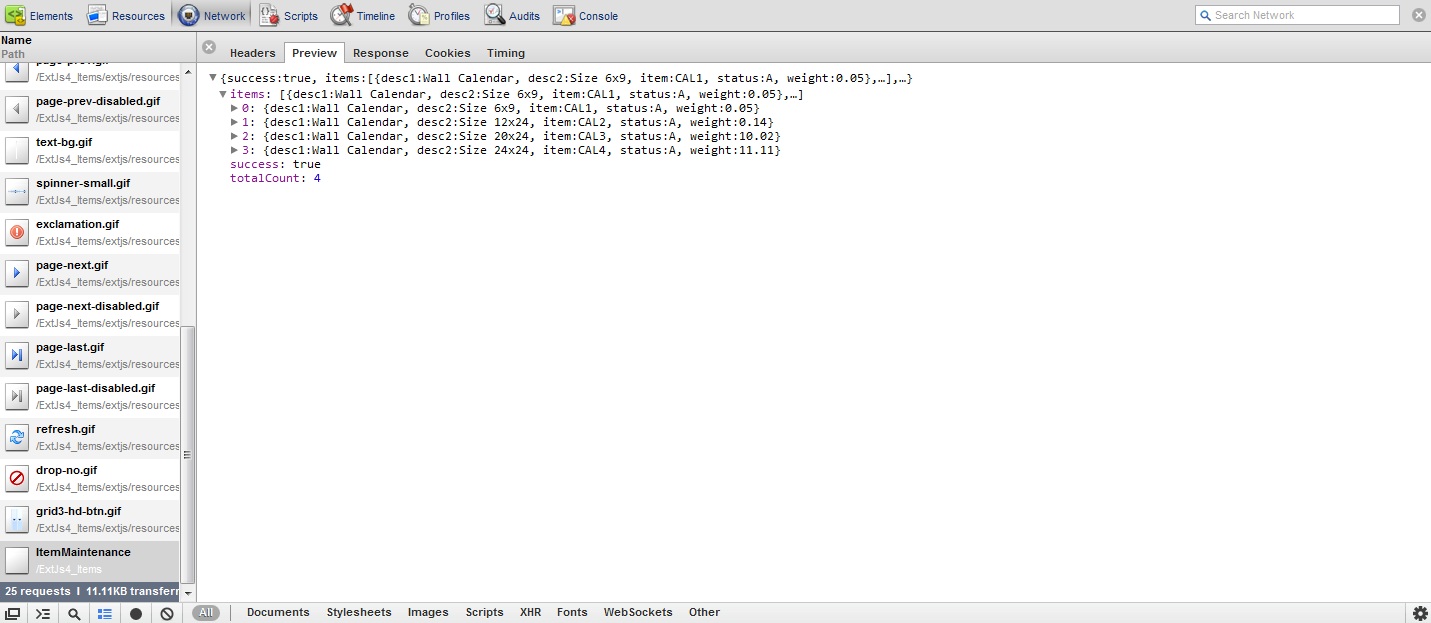
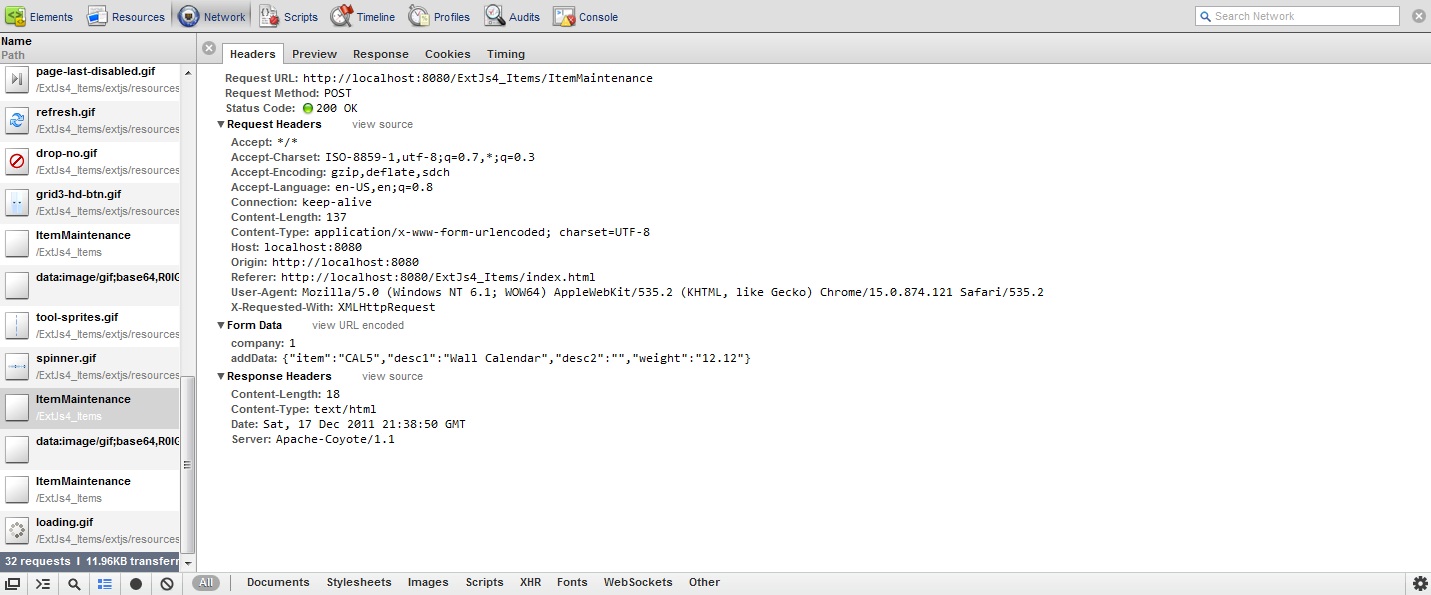
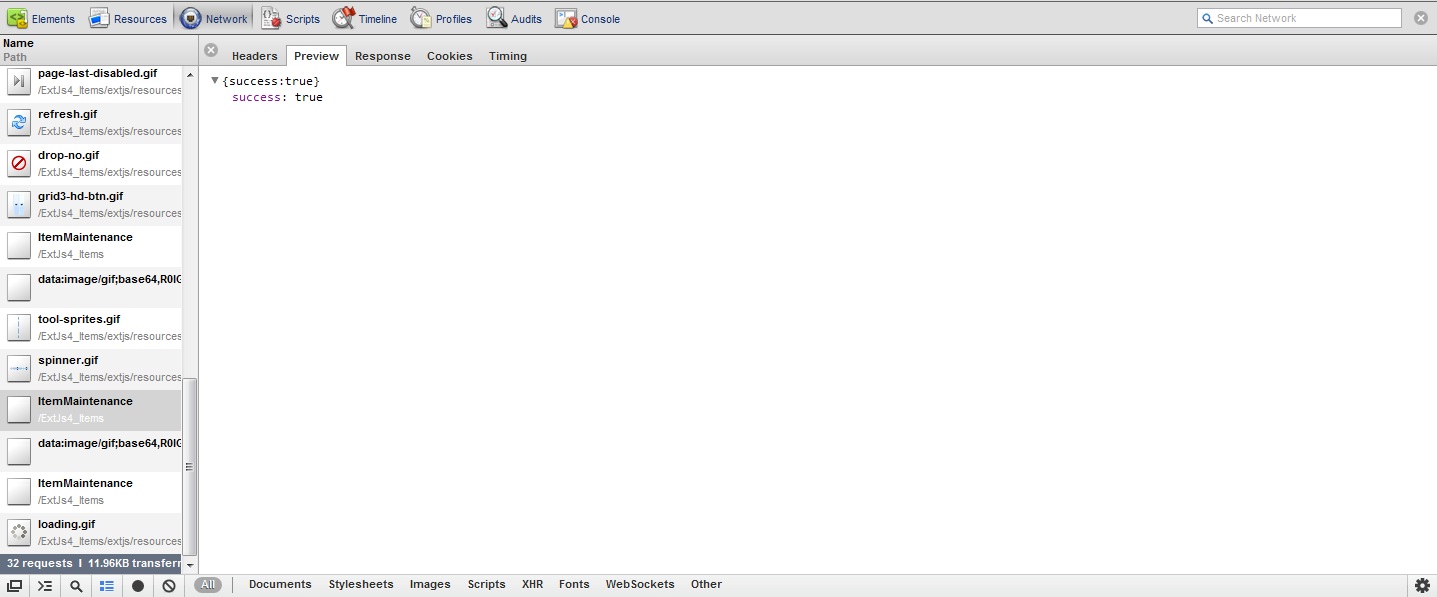
In the previous chapters we have completed our Item Maintenance application. Here we are going to review some of Http request and response logs.

When the application first loads


ExtJs 4 MVC Architecture tutorial using Java Servlets

During an Item Add


ExtJs 4 MVC Architecture tutorial using Java Servlets

During an Item Edit


ExtJs 4 MVC Architecture tutorial using Java Servlets

ExtJs 4 MVC Architecture tutorial using Java Servlets - Part 2

Click here for previous Chapter
So far we have discussed the directory structure of an ExtJs MVC application and the index.html file that will be starting point of our application. Also we have defined the context.xml for our JDBC resource to connect to a Database Server. Lets see how our app.js will look.

Step 4: Source for app.js

Ext.Loader.setConfig({ 
    enabled: true 
    });

Ext.application({
    name: 'IN',

    appFolder: 'app',
   
    controllers: [
                  'Items'
              ],

    launch: function() {
        Ext.create('Ext.container.Viewport', {
            items: [
                {
                    xtype: 'itemlist',
                }
            ]
        });
    }
});

Ext.application creates a new instance of Application class, to which we passed the name "IN". This automatically sets up a global variable IN for us, and registers the namespace to Ext.Loader, with the corresponding path of 'app' set via the appFolder config option.

The Application launch function runs automatically when everything is loaded. Here the launch function creates a Viewport which contains a single item with xtype as itemlist(still needs to be defined).

Step 5: Define the model - Item.js


A Model represents some object that your application manages. In this example we are going to use the model to represent out Product Table. Models are defined as a set of fields and any arbitrary methods and properties relevant to the model.
Ext.define('IN.model.Item', {
    extend: 'Ext.data.Model',
    fields: [
             'status',
             'item',
             'desc1',
             'desc2',
             'weight',
             ]
});

Step 6: Define the store that will contain the data - Items.js


Creating a Store is easy - we just tell it the Model and the Proxy to use to load and save its data. The Store class encapsulates a client side cache of Model objects. In the example below we configured an AJAX proxy to load data from the url 'ItemMaintenance'. Proxy uses a JsonReader to parse the response from the server into Model object.
Ext.define('IN.store.Items', {
    extend: 'Ext.data.Store',
    model: 'IN.model.Item',
    autoLoad: true,
    pageSize: 10,

    proxy: {
        type: 'ajax',
        url: 'ItemMaintenance',
        extraParams: {
            company: 1
        },
        reader: {
            type: 'json',
            totalProperty: 'totalCount',
            root: 'items',
            successProperty: 'success'
        },
     },
   
     listeners: {
         //After loading the store just commit all the records so only changes are sent when the store is synced
         load : function(store) {
             store.each(function(record) {
                record.commit();
            }); 
         } 
     }

});

Step 7: Create the Grid View Layout so that we can display list of Items - List.js


Grids are composed of two main pieces - a Store full of data and a set of columns to render. Grids are an excellent way of showing large amounts of tabular data on the client side. Essentially a supercharged <table>, GridPanel makes it easy to fetch, sort and filter large amounts of data.

In the store below we have added Paging using pagingtoolbar and a single button to Add a new Item.
Ext.define('IN.view.item.List' ,{
    extend: 'Ext.grid.Panel',
    alias : 'widget.itemlist',
    title : 'List of Items',
    store : 'Items',
    loadMask: true,
    autoheight: true,
    dockedItems: [{
        xtype: 'pagingtoolbar',
        store: 'Items',   
        dock: 'bottom',
        displayInfo: true,
        items: [
                { 
                    xtype: 'tbseparator' 
                },
                {
                    xtype : 'button',
                    text: 'Add Item',
                    action: 'add'
                }
        ]
    }],
    initComponent: function() {
        
        this.columns = [
            {header: 'Item Number', dataIndex: 'item',  flex: 1},
            {header: 'Description 1', dataIndex: 'desc1', flex: 1},
            {header: 'Description 2', dataIndex: 'desc2', flex: 1},
            {header: 'Weight', dataIndex: 'weight', flex: 1}
        ];

        this.callParent(arguments);
    }


});

Step 8: Create the Window Layout so that we can Add or Edit and Item - Edit.js


The window display the Item Number, Decsription1, Description 2 and weight so we can edit them. It has fit layout and also if you see the weight field has custom xtype named mynumberfield. This was done to display the weight in 2 decimal places. Click on the link below to get source for mynumberfield or just change the xtype to numberfield. In the window we have 2 buttons, one for saving the changes and the other one to close the window without making changes.

ExtJs 4 set Decimal precision using custom number field

Ext.define('IN.view.item.Edit', {
    extend: 'Ext.window.Window',
    alias : 'widget.itemedit',
    addMode : false,
    title : 'Edit Item Information',
    layout: 'fit',
    autoShow: true,

    initComponent: function() {
        this.items = this.buildItems();
        this.buttons = this.buildButtons();
        this.callParent(arguments);
    },
    buildItems: function(){
        return [
                {
                    xtype: 'form',
                    items: [
                        {
                            xtype: 'textfield',
                            itemId: 'itemNumber',
                            name : 'item',
                            allowBlank: false,
                            msgTarget: 'side',
                            fieldLabel: 'Item Number',
                            size: 11,
                            maxLength: 10
                        },
                        {
                            xtype: 'textfield',
                            name : 'desc1',
                            allowBlank: false,
                            msgTarget: 'side',
                            fieldLabel: 'Description 1',
                            size: 31,
                            maxLength: 30
                        },
                        {
                            xtype: 'textfield',
                            name : 'desc2',
                            fieldLabel: 'Description 2',
                            size: 31,
                            maxLength: 30   
                        },
                        {
                            xtype: 'mynumberfield', 
                            name : 'weight',
                            value: 0,
                            minValue: 0,
                            fieldLabel: 'Weight',
                            decimalPrecision:2,
                            step:0.01
                         }
                    ]
                }
            ];
    },
    buildButtons: function(){
        return [
                {
                    text: 'Save',
                    action: 'save'
                },
                {
                    text: 'Cancel',
                    scope: this,
                    handler: this.close
                }];
    }
   
});

Click here for next Chapter
ExtJs 4 MVC Architecture tutorial using Java Servlets - Part 3

Click here for previous Chapter
In the previous post we have defined the Application(app.js), Model(Item.js), Store(Items.js), GridPanel(List.js) and Window for editing(Edit.js). In this chapter we are going to discuss the controller which is going to bind all the things together and make our application work. Before that lets see how our grid and the window looks like.

ExtJs 4 MVC Architecture tutorial using Java Servlets

ExtJs 4 MVC Architecture tutorial using Java Servlets


Step 9: Define the controller that will bind everything together - Items.js

Ext.define('IN.controller.Items', {
            extend : 'Ext.app.Controller',

            //define the stores
            stores : ['Items'],
            //define the models
            models : ['Item'],
            //define the views
            views : ['item.List', 'item.Edit', 'item.MyNumberField'],

            //special method that is called when your application boots
            init : function() {
                
                //control function makes it easy to listen to events on
                //your view classes and take some action with a handler function
                this.control({
                    
                            //when the viewport is rendered
                            'viewport > panel' : {
                                render : this.onPanelRendered
                            },
                            
                            //when you double click on the grid layout
                            'itemlist' : {
                                itemdblclick : this.editItem
                            },
                            
                            //when you click in the grid toolbar Add button
                            'itemlist button[action=add]' : {
                                click : this.addItem   
                            },
                            
                            //when you click on the Edit window save button
                            'itemedit button[action=save]' : {
                                click : this.updateItem
                            }
                        });
            },

            onPanelRendered : function() {
                //just a console log to show when the panel si rendered
                console.log('The panel was rendered');
            },

            addItem : function() {
                //create the window and set the mode to Add
                var view = Ext.widget('itemedit');
                view.addMode = true;
            },

            editItem : function(grid, record) {
                //create the window for editing
                //the double click on the row sends the grid row record
                var view = Ext.widget('itemedit');
                //load the record into the form
                view.down('form').loadRecord(record);
                //get the Item Number field in the form and protect it
                view.down('form').getComponent('itemNumber').setReadOnly(true);
                
            },

            updateItem : function(button) {
                //get access to the window using the button reference
                var win = button.up('window');
                //get access to the form using the window reference
                form = win.down('form');
                
                //Add an Item
                if(win.addMode){
                    //check if the form passed all validations
                    if(form.getForm().isValid()){
                        //if there are no errors then send the Add request to server
                        Ext.Ajax.request({
                            url: 'ItemMaintenance',
                            params: {
                            company: 1,
                            //this encodes the form values to a JSON object
                            addData: Ext.encode(form.getValues())
                            },
                            scope:this,
                            //method to call when the request is successful
                            success: this.onSaveSuccess,
                            //method to call when the request is a failure
                            failure: this.onSaveFailure
                        });
                        //close the window
                        win.close();
                    }
                }
                else {
                    //get reference to the record
                    record = form.getRecord();
                    //get reference to the form values
                    values = form.getValues();
                    //set the record with new values
                    record.set(values);
                    //close the window
                    win.close();
                    //Ask the stote to sync the new data with the server
                    this.getItemsStore().sync();
                }
            },
            
            onSaveFailure: function(err){
                //Alert the user about communication error
                Ext.MessageBox.alert('Status', 'Error occured during Item Add');
            },
   
            onSaveSuccess: function(response){
                //Alert the user about communication error
                Ext.MessageBox.alert('Status', 'Item successfully Added');
                //load the store to get the new Item that was added
                this.getItemsStore().load();
            }
        
    });

Now we need to work on the server side so that our ExtJs request can be processed!
Lets define the Java bean, JDBC connections to the database and our Servlet that will interact with the ExtJs application.

ExtJs 4 MVC Architecture tutorial using Java Servlets

Step 10: Define the java bean - Item.java

package com.as400samplecode.util;

public class Item {
   
    String status = null;
    String item = null;
    String desc1 = null;
    String desc2 = null;
    Double weight = null;
   
    public String getStatus() {
        return status;
    }
    public void setStatus(String status) {
        this.status = status;
    }
    public String getItem() {
        return item;
    }
    public void setItem(String item) {
        this.item = item;
    }
    public String getDesc1() {
        return desc1;
    }
    public void setDesc1(String desc1) {
        this.desc1 = desc1;
    }
    public String getDesc2() {
        return desc2;
    }
    public void setDesc2(String desc2) {
        this.desc2 = desc2;
    }
    public Double getWeight() {
        return weight;
    }
    public void setWeight(Double weight) {
        this.weight = weight;
    }
   
}

Click here for next Chapter

ExtJs 4 MVC Architecture tutorial using Java Servlets - Part 4

Click here for previous Chapter
So far we have discussed the complete ExtJs 4 MVC architecture and needed sources for our Item Maintenance application. We have started to work on the Server Side and created our Item bean.

Step 11: Define the Item utility function that will work with our database - ItemInformation.java

package com.as400samplecode.util;

import java.sql.Connection;          
import java.sql.ResultSet;           
import java.sql.SQLException;        
import java.sql.PreparedStatement;   
import java.util.ArrayList;

import javax.naming.Context;         
import javax.naming.InitialContext;  
import javax.sql.DataSource;         

public class ItemInformation {            

    Connection conn = null;             
    PreparedStatement stmt = null;      
    String sql = null;
    String company = null;

    int numberOfRows = 0;


    public ItemInformation(String company) {
        this.company = company;
    }

    //this method gets us a list of items based on the parameters start and limit
    //these parameters are sent to use by the ExtJs Grid paging toolbar
    //we use a scrollable resultset and position it to start from where we need our records
    public ArrayList<Item> getItems(String start, String limit) {  

        ArrayList<Item> itemList = new ArrayList<Item>();    

        try {       
            Context ctx = (Context) new InitialContext().lookup("java:comp/env");
            conn = ((DataSource) ctx.lookup("jdbc/mydb2")).getConnection(); 

            int skipRows = Integer.parseInt(start);
            numberOfRows = skipRows + Integer.parseInt(limit);

            sql = "Select ITEMNO,DESC1,DESC2,WEIGHT,STATUS " + 
            " from PRODUCTS where COMPANY = ? order by COMPANY,ITEMNO FETCH FIRST " + numberOfRows + " ROWS ONLY";                       

            stmt = conn.prepareStatement(sql,ResultSet.TYPE_SCROLL_INSENSITIVE, ResultSet.CONCUR_READ_ONLY);
            stmt.setInt(1,Integer.parseInt(company)); 

            ResultSet rs = stmt.executeQuery();  
            rs.relative(skipRows);
            
            while(rs.next()){ 
                Item item = new Item();
                item.setItem(rs.getString("ITEMNO").trim());
                item.setDesc1(rs.getString("DESC1").trim());
                item.setDesc2(rs.getString("DESC2").trim());
                item.setWeight(Double.parseDouble(rs.getString("WEIGHT").trim()));
                item.setStatus(rs.getString("STATUS").trim());
                itemList.add(item);
            }                                                                          

            rs.close();                                                                
            stmt.close();                                                              
            stmt = null;                                                               


            conn.close();                                                              
            conn = null;                                                    

        }                                                                
        catch(Exception e){System.out.println(e);}                       

        finally {                                                        
            
            if (stmt != null) {                                             
                try {                                                          
                    stmt.close();                                                 
                } catch (SQLException sqlex) {                                 
                    // ignore -- as we can't do anything about it here            
                }                                                              

                stmt = null;                                             
            }                                                         

            if (conn != null) {                                       
                try {                                                    
                    conn.close();                                           
                } catch (SQLException sqlex) {                           
                    // ignore -- as we can't do anything about it here      
                }                                                        

                conn = null;                                             
            }                                                         
        }               

        return itemList;

    }   
    
    //this method gets us the Total Number of Items that we have in our database
    public int getTotalCount() {  

        int totalCount = 0; 

        try {       
            Context ctx = (Context) new InitialContext().lookup("java:comp/env");
            conn = ((DataSource) ctx.lookup("jdbc/mydb2")).getConnection(); 

            sql = "Select count(*) from PRODUCTS where COMPANY = ?";                       

            stmt = conn.prepareStatement(sql);
            stmt.setInt(1,Integer.parseInt(company)); 

            ResultSet rs = stmt.executeQuery();  
            while(rs.next()){ 
                totalCount = rs.getInt(1);
                break;
            }                                                                          

            rs.close();                                                                
            stmt.close();                                                              
            stmt = null;                                                               


            conn.close();                                                              
            conn = null;                                                    

        }                                                                
        catch(Exception e){System.out.println(e);}                       

        finally {                                                        
            
            if (stmt != null) {                                             
                try {                                                          
                    stmt.close();                                                 
                } catch (SQLException sqlex) {                                 
                    // ignore -- as we can't do anything about it here            
                }                                                              

                stmt = null;                                             
            }                                                         

            if (conn != null) {                                       
                try {                                                    
                    conn.close();                                           
                } catch (SQLException sqlex) {                           
                    // ignore -- as we can't do anything about it here      
                }                                                        

                conn = null;                                             
            }                                                         
        }               

        return totalCount;

    }   

    //this methods loops thru an arraylist of Items and update the changed information
    public boolean updateItems(ArrayList<Item> itemList) {  

        boolean success = true;
        
        try {       
            Context ctx = (Context) new InitialContext().lookup("java:comp/env");
            conn = ((DataSource) ctx.lookup("jdbc/mydb2")).getConnection(); 

            sql = "UPDATE PRODUCTS set DESC1 = ?,DESC2 = ?,WEIGHT = ? where COMPANY = ? and ITEMNO = ?";
            stmt = conn.prepareStatement(sql);
            
            for(int i=0;i<itemList.size();i++){
                Item item = itemList.get(i);
                stmt.setString(1,item.getDesc1()); 
                stmt.setString(2,item.getDesc2()); 
                stmt.setDouble(3,item.getWeight()); 
                stmt.setInt(4,Integer.parseInt(company)); 
                stmt.setString(5,item.getItem()); 
                stmt.addBatch();
            }
            
            stmt.executeBatch();
            
            
            stmt.close();                                                              
            stmt = null;                                                               
            conn.close();                                                              
            conn = null;                                                    

        }                                                                
        catch(Exception e){
            
            success = false;
            System.out.println(e);
            
        }                       

        finally {                                                        
            
            if (stmt != null) {                                             
                try {                                                          
                    stmt.close();                                                 
                } catch (SQLException sqlex) {                                 
                    // ignore -- as we can't do anything about it here            
                }                                                              

                stmt = null;                                             
            }                                                         

            if (conn != null) {                                       
                try {                                                    
                    conn.close();                                           
                } catch (SQLException sqlex) {                           
                    // ignore -- as we can't do anything about it here      
                }                                                        

                conn = null;                                             
            }                                                         
        }               

        return success;

    }   

    //this method creates a new Item in the database
    public boolean addItems(ArrayList<Item> itemList) {  

        boolean success = true;
        
        try {       
            Context ctx = (Context) new InitialContext().lookup("java:comp/env");
            conn = ((DataSource) ctx.lookup("jdbc/mydb2")).getConnection(); 

            sql = "INSERT into PRODUCTS (COMPANY,ITEMNO,DESC1,DESC2,WEIGHT,STATUS) VALUES(?,?,?,?,?,?)";
            stmt = conn.prepareStatement(sql);
            
            for(int i=0;i<itemList.size();i++){
                Item item = itemList.get(i);
                stmt.setInt(1,Integer.parseInt(company)); 
                stmt.setString(2,item.getItem()); 
                stmt.setString(3,item.getDesc1()); 
                stmt.setString(4,item.getDesc2()); 
                stmt.setDouble(5,item.getWeight()); 
                stmt.setString(6,"A");
                stmt.addBatch();
            }
            
            stmt.executeBatch();
            
            
            stmt.close();                                                              
            stmt = null;                                                               
            conn.close();                                                              
            conn = null;                                                    

        }                                                                
        catch(Exception e){
            
            success = false;
            System.out.println(e);
            
        }                       

        finally {                                                        
            
            if (stmt != null) {                                             
                try {                                                          
                    stmt.close();                                                 
                } catch (SQLException sqlex) {                                 
                    // ignore -- as we can't do anything about it here            
                }                                                              

                stmt = null;                                             
            }                                                         

            if (conn != null) {                                       
                try {                                                    
                    conn.close();                                           
                } catch (SQLException sqlex) {                           
                    // ignore -- as we can't do anything about it here      
                }                                                        

                conn = null;                                             
            }                                                         
        }               

        return success;

    }   
}

Click here for next Chapter