This tutorial covers the following topics
- How to create a ExtJs 4 Tree Panel
- Expanding and collapsing of the Tree Nodes
- Get Tree node data from Java Servlet in JSON format
- Database behind the Tree node is MySQL
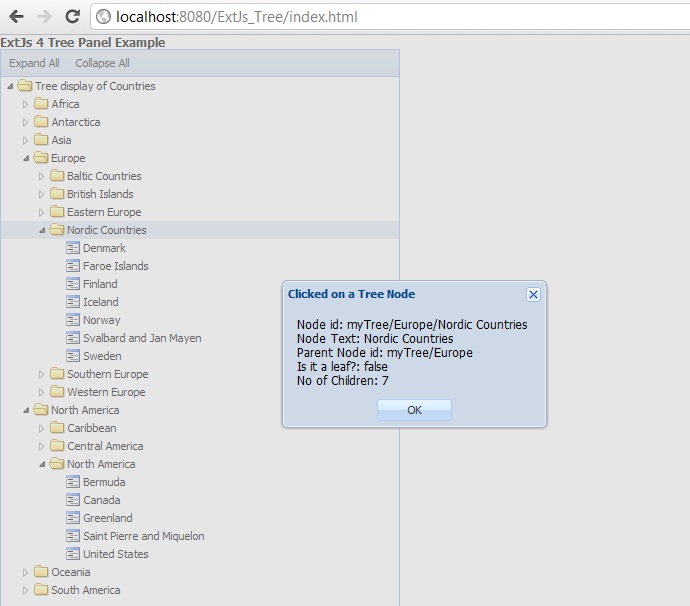
- Tree node click event to capture the node value and other attributes that can be useful for further processing
- Basic Drag and Drop plugin
- Asynchronous loading through a TreeStore and AjaxProxy.
The TreePanel
Ext.tree.Panel provides tree-structured UI representation of tree-structured data. A TreePanel must be bound to a
Ext.data.TreeStore. The TreeStore is a store implementation that is backed by by an
Ext.data.Tree. It provides convenience methods for loading nodes, as well as the ability to use the hierarchical tree structure combined with a store.In our Tree example we start with Continents, from there you can drill down to Regions and then to Countries.
Application starting point index.html
<html>
<head>
    <title>ExtJs 4 Tree Panel Example using Java Servlet and MySQL database</title>

    <link rel="stylesheet" type="text/css" href="extjs/resources/css/ext-all.css">

    <script type="text/javascript" src="extjs/ext-all-debug.js"></script>
    <script type="text/javascript" src="app.js"></script>

</head>
<body></body>
</html>
Application JavaScript file app.js
Ext.Loader.setConfig({
    enabled: true
    });

Ext.application({
    name: 'TR',

    appFolder: 'app',

    controllers: [
                  'Countries'
              ],

    launch: function() {
        Ext.create('Ext.container.Viewport', {
            items: [
                {
                    xtype: 'label',
                    html: '<b>ExtJs 4 Tree Panel Example</b>'
                },
                {
                    xtype: 'countryTree',
                }
            ]
        });
    }
});
JavaScript source file for the Tree Store Countries.js
Ext.define('TR.store.Countries', {
    extend: 'Ext.data.TreeStore',
    proxy: {
        type: 'ajax',
        url: 'CountryServlet'
    },
    root: {
        text: 'Tree display of Countries',
        id: 'myTree',
        expanded: true
    },
    folderSort: true,
    sorters: [{
        property: 'text',
        direction: 'ASC'
    }]

});
JavaScript source file for the Tree Panel View CountryTree.js
Ext.define('TR.view.CountryTree', {
    extend: 'Ext.tree.Panel',
    alias: 'widget.countryTree',
    store: 'Countries',
    viewConfig: {
        plugins: {
            ptype: 'treeviewdragdrop'
        }
    },
    height: 600,
    width: 400,
    useArrows: true,
    dockedItems: [{
        xtype: 'toolbar',
        items: [{
            text: 'Expand All',
        }, {
            text: 'Collapse All',
        }]
    }]
});
JavaScript source file for the application controller Countries.js
Ext.define('TR.controller.Countries', {
            extend : 'Ext.app.Controller',

            //define the stores
            stores : ['Countries'],
            //define the models
            models : [],
            //define the views
            views : ['CountryTree'],
            refs: [{
                    ref: 'myCountryTree',
                    selector: 'countryTree'
                    }
            ],

            init : function() {
                this.control({

                    'viewport' : {
                        render : this.onPanelRendered
                    },
                    'countryTree button[text=Expand All]' : {
                        click : this.expandAll
                    },
                    'countryTree button[text=Collapse All]' : {
                        click : this.collapseAll
                    },
                    'countryTree' : {
                        itemclick : this.treeItemClick
                    }
                });
            },

            onPanelRendered : function() {
                //just a console log to show when the panel si rendered
                console.log('The panel was rendered');
            },

            expandAll : function() {
                //expand all the Tree Nodes
                var myTree = this.getMyCountryTree();
                myTree.expandAll();
            },

            collapseAll : function() {
                //expand all the Tree Nodes
                var myTree = this.getMyCountryTree();
                myTree.collapseAll();
            },

            treeItemClick : function(view, record) {
                //some node in the tree was clicked
                //you have now access to the node record and the tree view
                Ext.Msg.alert('Clicked on a Tree Node',
                    'Node id: ' + record.get('id') + '\n' +
                    'Node Text: ' + record.get('text') + '\n' +
                    'Parent Node id: ' + record.get('parentId') + '\n' +
                    'Is it a leaf?: ' + record.get('leaf') + '\n' +
                    'No of Children: ' + record.childNodes.length
                );
                //now you have all the information about the node
                //Node id
                //Node Text
                //Parent Node
                //Is the node a leaf?
                //No of child nodes
                //......................
                //go do some real world processing
            }

    });
Sample JSON response from the Servlet
Click here for next Chapter



No comments:
Post a Comment
NO JUNK, Please try to keep this clean and related to the topic at hand.
Comments are for users to ask questions, collaborate or improve on existing.