Sometimes there is need for dynamically generating screen layout based on data from SQLITE database tables, such as question answer forms, etc. Also you can use this along with static XML layouts to design more User friendly application. Depending on the application need, you can choose a mixture of static XML, inflating XML views using code and generating views directly using Java code in an Activity.
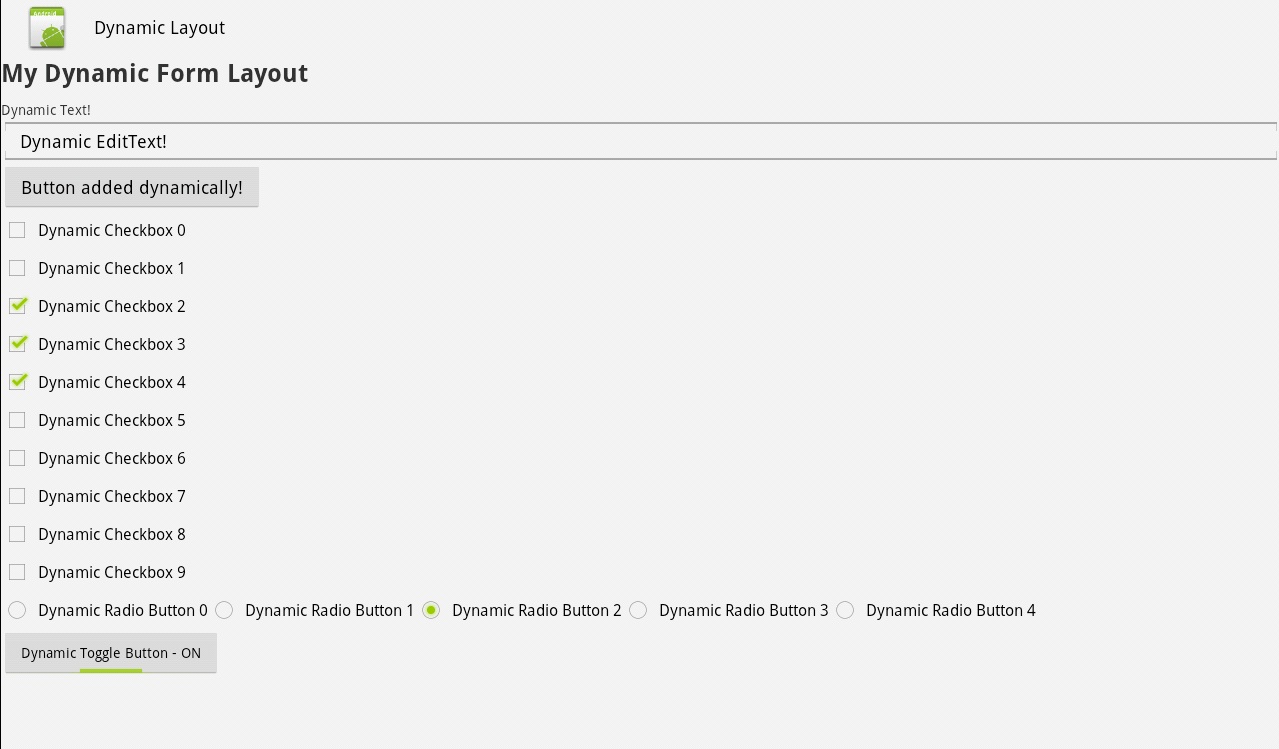
In this tutorial we will learn how to programmatically add the following views using Java Code in an Android Activity
- Button
- TextView
- EditText
- RadioButton
- CheckBox
- ToggleButton
Here is a sample code to help you get started
package com.as400samplecode;

import android.app.Activity;
import android.os.Bundle;
import android.util.Log;
import android.view.Gravity;
import android.view.View;
import android.view.ViewGroup;
import android.view.View.OnClickListener;
import android.widget.Button;
import android.widget.CheckBox;
import android.widget.EditText;
import android.widget.LinearLayout;
import android.widget.RadioButton;
import android.widget.RadioGroup;
import android.widget.TextView;
import android.widget.Toast;
import android.widget.ToggleButton;
import android.widget.LinearLayout.LayoutParams;

public class DynamicLayoutActivity extends Activity implements OnClickListener{

    private static final int MY_BUTTON = 9000;

    @Override
    public void onCreate(Bundle savedInstanceState) {
        super.onCreate(savedInstanceState);
        setContentView(R.layout.main);

        LinearLayout ll = (LinearLayout)findViewById(R.id.linearLayout2);

        // add text view
        TextView tv = new TextView(this);
        tv.setText("Dynamic Text!");
        ll.addView(tv);

        // add edit text
        EditText et = new EditText(this);
        et.setText("Dynamic EditText!");
        et.setMinLines(1);
        et.setMaxLines(3);
        ll.addView(et);

        // add button
        Button b = new Button(this);
        b.setText("Button added dynamically!");
        b.setLayoutParams(new LayoutParams(LayoutParams.WRAP_CONTENT, LayoutParams.WRAP_CONTENT));
        b.setId(MY_BUTTON);
        b.setOnClickListener(this);
        ll.addView(b);

        //add checkboxes
        for(int i = 0; i < 10; i++) {
            CheckBox cb = new CheckBox(this);
            cb.setText("Dynamic Checkbox " + i);
            cb.setId(i+10);
            ll.addView(cb);
        }

        //add radio buttons
        final RadioButton[] rb = new RadioButton[5];
        RadioGroup rg = new RadioGroup(this); //create the RadioGroup
        rg.setOrientation(RadioGroup.HORIZONTAL);//or RadioGroup.VERTICAL
        for(int i=0; i<5; i++){
            rb[i]  = new RadioButton(this);
            rb[i].setText("Dynamic Radio Button " + i);
            rb[i].setId(i);
            rg.addView(rb[i]); //the RadioButtons are added to the radioGroup instead of the layout

        }
        ll.addView(rg);//you add the whole RadioGroup to the layout

        // add Toggle button
        ToggleButton tb = new ToggleButton(this);
        tb.setTextOn("Dynamic Toggle Button - ON");
        tb.setTextOff("Dynamic Toggle Button - OFF");
        tb.setChecked(true);
        tb.setLayoutParams(new LayoutParams(LayoutParams.WRAP_CONTENT, LayoutParams.WRAP_CONTENT));
        ll.addView(tb);

    }

    public void onClick(View v) {
        Toast toast;
        Log.w("ANDROID DYNAMIC VIEWS:", "View Id: " + v.getId());
        switch (v.getId()) {
        case MY_BUTTON:
            toast = Toast.makeText(this, "Clicked on my dynamically added button!", Toast.LENGTH_LONG);
            toast.setGravity(Gravity.TOP, 25, 400);
            toast.show();
            saveAnswers();
            break;
            // More buttons go here (if any) ...

        }
    }

    public void saveAnswers() {
        LinearLayout root = (LinearLayout) findViewById(R.id.linearLayout1); //or whatever your root control is
        loopQuestions(root);
    }

    private void loopQuestions(ViewGroup parent) {
        for(int i = 0; i < parent.getChildCount(); i++) {
            View child = parent.getChildAt(i);
            if(child instanceof RadioGroup ) {
                //Support for RadioGroups
                RadioGroup radio = (RadioGroup)child;
                storeAnswer(radio.getId(), radio.getCheckedRadioButtonId());
            }
            else if(child instanceof CheckBox) {
                //Support for Checkboxes
                CheckBox cb = (CheckBox)child;
                int answer = cb.isChecked() ? 1 : 0;
                storeAnswer(cb.getId(), answer);
            }
            else if(child instanceof EditText) {
                //Support for EditText
                EditText et = (EditText)child;
                Log.w("ANDROID DYNAMIC VIEWS:", "EdiText: " + et.getText());
            }
            else if(child instanceof ToggleButton) {
                //Support for ToggleButton
                ToggleButton tb = (ToggleButton)child;
                Log.w("ANDROID DYNAMIC VIEWS:", "Toggle: " + tb.getText());
            }
            else {
                //Support for other controls
            }

            if(child instanceof ViewGroup) {
                //Nested Q&A
                ViewGroup group = (ViewGroup)child;
                loopQuestions(group);
            }
        }
    }

    private void storeAnswer(int question, int answer) {
        Log.w("ANDROID DYNAMIC VIEWS:", "Question: " + String.valueOf(question) + " * "+ "Answer: " + String.valueOf(answer) );

        Toast toast = Toast.makeText(this, String.valueOf(question) + " * "+ "Answer: " + String.valueOf(answer), Toast.LENGTH_LONG);
        toast.setGravity(Gravity.TOP, 25, 400);
        toast.show();


    }

}
Source for main.xml
<?xml version="1.0" encoding="utf-8"?>
<LinearLayout xmlns:android="http://schemas.android.com/apk/res/android"
    android:orientation="vertical"
    android:layout_width="fill_parent"
    android:layout_height="fill_parent"
    >
<LinearLayout android:id="@+id/linearLayout1" android:layout_height="match_parent"
 android:orientation="vertical" android:layout_width="match_parent">
    <TextView android:id="@+id/textView5" android:text="My Dynamic Form Layout"
  android:layout_height="wrap_content" android:layout_width="match_parent"
  android:textStyle="bold" android:textSize="25sp" android:paddingBottom="10dp">
 </TextView>
    <ScrollView android:layout_height="match_parent" android:id="@+id/scrollView1"
  android:layout_width="match_parent">
        <LinearLayout android:id="@+id/linearLayout2" android:layout_width="match_parent"
   android:orientation="vertical" android:layout_height="match_parent">
       </LinearLayout>
    </ScrollView>
</LinearLayout>
</LinearLayout>
Source for AndroidManifest.xml
<?xml version="1.0" encoding="utf-8"?>
<manifest xmlns:android="http://schemas.android.com/apk/res/android"
    package="com.as400samplecode" android:versionCode="1"
    android:versionName="1.0">
    <uses-sdk android:minSdkVersion="13" />

    <application android:icon="@drawable/icon" android:label="@string/app_name"
        android:theme="@android:style/Theme.Holo.Light">
        <activity android:name=".DynamicLayoutActivity"
            android:label="@string/app_name">
            <intent-filter>
                <action android:name="android.intent.action.MAIN" />
                <category android:name="android.intent.category.LAUNCHER" />
            </intent-filter>
        </activity>

    </application>
</manifest>
Recommended Reading
No comments:
Post a Comment
NO JUNK, Please try to keep this clean and related to the topic at hand.
Comments are for users to ask questions, collaborate or improve on existing.